




zof is a Python framework for creating asyncio-based applications that control the network using the OpenFlow protocol.
- OpenFlow versions 1.0 – 1.4 (with partial support for 1.5)
- TLS connections
- Limited packet parsing and generation: ARP, LLDP, IPv4, IPv6, UDP, TCP, ICMPv4, ICMPv6
- App’s can simulate switches; Supports both sides of the OpenFlow protocol
- Python 3.5.1 or later
- oftr command line tool
# Install /usr/bin/oftr dependency.
sudo add-apt-repository ppa:byllyfish/oftr
sudo apt-get update
sudo apt-get install oftr

# Create virtual environment and install latest zof.
python3.5 -m venv myenv
source myenv/bin/activate
pip install zof
The oftr command line tool can also be installed on a Raspberry PI or using HomeBrew.
To run the layer2 controller demo:
python -m zof.demo.layer2
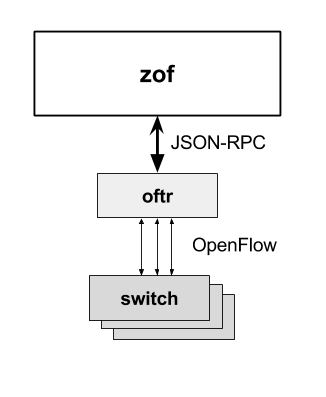
zof uses a separate oftr process to terminate OpenFlow connections and translate OpenFlow messages to JSON.

Architecture: The oftr process translates OpenFlow to JSON.
You construct OpenFlow messages via YAML strings or Python dictionaries. Incoming OpenFlow messages are generic Python objects. Special OpenFlow constants such as ‘NO_BUFFER’ appear as strings.
type: FLOW_MOD
msg:
  command: ADD
  match:
    - field: IN_PORT
      value: 1
    - field: ETH_DST
      value: 00:00:00:00:00:01
  instructions:
    - instruction: APPLY_ACTIONS
      actions:
        - action: OUTPUT
          port_no: 2
The basic building block of zof is an app. An app is associated with various message and event handlers.
You create an app object using the zof.Application class. Then, you associate handlers using the app’s message decorator.
import zof

APP = zof.Application('app_name_here')

@APP.message('packet_in')
def packet_in(event):
    APP.logger.info('packet_in message %r', event)

@APP.message(any)
def other(event):
    APP.logger.info('other message %r', event)

if __name__ == '__main__':
    zof.run()
Place the above text in a file named demo.py and run it with python demo.py. This app handles OpenFlow ‘PACKET_IN’ messages using the packet_in function. All other messages are dispatched to the other function. The app does not do anything; it just logs events.
To compose the demo.py program with the layer2 demo:
python demo.py --x-modules=zof.demo.layer2
Leave a Reply